To convert film to digital, your reel is cleaned and inspected, then scanned one frame at a time at Full HD or 2K resolution with grain reduction and accurate color correction, and delivered as digital files on a hard drive, DVD, Blu-ray, USB drive or SD card. That is the whole process in one sentence. The most important thing to know before you start: do not project old film to preview it first. That single step is where most damage happens.
The belief most people arrive with (and why it is backwards)
Almost everyone wants to “just check what’s on the reels” before spending money. It feels responsible. It is actually the riskiest thing you can do. Projector bulbs dry out film with heat. The projector’s gate and rollers rub against the surface and leave scratches. Old splices let go. You can lose in ten minutes what survived sixty years in a closet.
Film does not wait either. Humidity and temperature have to sit at just the right level or film fades and turns brittle, and magnetic tape has its own decay clock running. The earlier you digitize, the more original quality gets captured, because you are copying the film as it is today rather than as it will be in five years. Our 8mm and 16mm film transfer service exists for exactly this reason: to stop the aging process while there is still something worth preserving.
What “frame by frame” actually means
Here is the difference that decides your final quality. Most transfer outlets will gladly put your film on a projector, point a camera at the screen, and hand you the recording. You get flicker, hot spots, keystone distortion, and a copy of a projection rather than a copy of the film.
Frame-by-frame scanning works differently. Your film moves through a scanner that takes a separate, individual scan of every single frame. Nothing is projected. Nothing is filmed off a wall. Each frame is captured on its own terms, which is why the result looks steady and accurate instead of shaky and washed out. You can read more about how we transfer film differently if you want the step-by-step.
This is also why real film transfer is not fast.
Frame-by-frame scanning alone takes two to three times the running length of your film – a 30-minute reel means 60 to 90 minutes of scanning before any color work begins.
The full process, start to finish
1. Cleaning and inspection
Before anything touches a scanner, the reel is cleaned and inspected. Dust, mold spots, brittle leader, failing splices – all of it gets found before it becomes a problem mid-scan.
2. Frame-by-frame scanning
Each frame is scanned individually at Full HD or 2K resolution. This is the stage where most of the quality is won or lost.
3. Grain reduction and color correction
Old film shifts color as it ages, and grain gets more pronounced. Grain reduction and accurate color correction bring the image back toward what the camera originally saw, without turning your grandmother’s kitchen into a video game.
4. Delivery
Files come back on a hard drive, DVD, Blu-ray, USB drive or SD card – whatever fits how your family actually watches things. If you are also converting video, photos, slides or audio, everything can go on the same drive in organized folders so your whole archive lives in one place.
Which films can be converted
The common home movie formats are simpler than the names suggest:
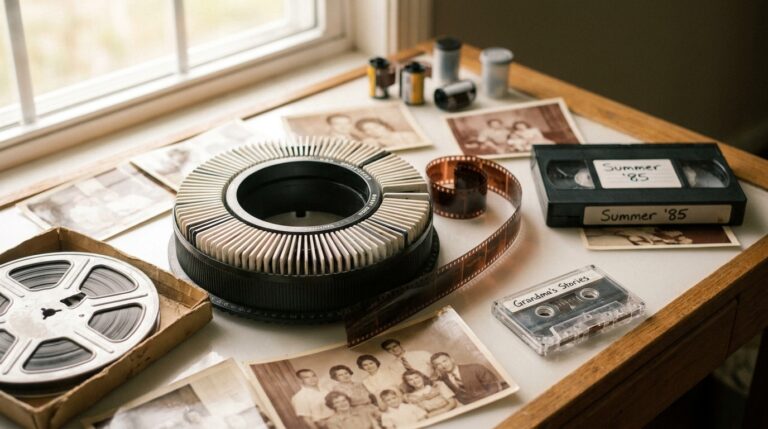
- 8mm (Regular 8): the standard home movie film of the 1930s through 1960s.
- Super 8: the 1965-and-later update, same width but a bigger picture area per frame.
- 16mm: a wider, higher-quality film used for serious home movies, industrial and news footage, and the format where a 400 ft reel’s transfer cost depends most on who handles the scan.
- Technicolor reel-to-reel: older color print film that often holds up beautifully once scanned.
All four are handled with the same trusted process the Academy of Motion Pictures in Hollywood uses on its legacy archives, including original prints from Alfred Hitchcock and many others. If you would rather see the reasoning behind that approach first, here is why families choose Legacy Digital for film transfers.
Is doing it yourself cheaper?
Not always, and often not at all. A high quality film transfer machine can easily run into the thousands of dollars, and even then your results depend on your own test runs and exposure settings. There are really only three DIY methods for getting 8mm film to digital: recording the projected image, capturing frame by frame with a DSLR adapter, or running the reels through a consumer transfer machine. DIY output quality varies widely, and there is a greater chance of damaging the original film while you learn. Budget mail-in services are not automatically the answer either, since bulk operations like Legacybox scan film at 480p standard definition with no color correction or restoration. For a one-time project on irreplaceable reels, a professional transfer is usually both the better value and the lower risk, as long as you know how to choose a transfer service and what should move the price.
Frequently asked questions
Can I watch my old film before converting it to digital?
Please do not. Projecting old film to preview it is where most damage happens. Heat from the bulb dries the film and the projector mechanism rubs against the surface and causes scratches. A frame-by-frame scan gives you a safe way to see everything on the reel for the first time.
How long does it take to convert film to digital?
It varies by how many reels you have and their condition, but the scanning step alone takes two to three times the running length of your film. Cleaning, inspection, grain reduction and color correction are on top of that. Real quality is not a same-hour service.
What resolution is my film scanned at?
Full HD or 2K resolution, with grain reduction and accurate color correction available so the finished video looks its best on modern screens and devices.
Do I get my original film reels back?
Always. Your originals are carefully packaged and returned along with your new digital copies. The same is true of negatives and other originals you send for scanning.
What formats can I get my converted film on?
Hard drive, DVD, Blu-ray, USB drive or SD card. Many families choose a hard drive for the archive and a DVD or Blu-ray for the relatives who still want something to put in a player.
Why not just have someone videotape the projected film?
Because you end up with a recording of a wall, not a copy of your film. Most transfer outlets do exactly that. Scanning each frame separately is the painstaking way, and it is the reason the result looks clear and accurate.
A simple next step
You do not have to commit to anything today. Pull your reels out of the closet, count them, and note anything written on the boxes. If you want the whole picture first, read the complete guide to converting film to digital. When you are ready, you can request a free estimate and ask whatever questions you have. Legacy Digital has been converting film for over 20 years and more than 20,000 customers, and the reels only get older from here.
Reviewed by Scott Foster, Founder of Legacy Digital Productions, Orange, CA - transferring film, tape, slides, photos and audio in-house since 2001 - last updated August 11, 2026.
Sources for this article
- Process: reel cleaned and inspected, scanned one frame at a time at Full HD or 2K, grain reduction and accurate color correction, delivered on hard drive, DVD, Blu-ray, USB drive o
- Do not project old film to preview it first - that step is where most damage happens
- Projector bulbs dry film with heat; projectors rub against film causing scratches; humidity and temperature must be maintained or film fades and becomes brittle
- Legacy Digital handles 8mm, Super 8, 16mm and Technicolor reel-to-reel film
- Same trusted process the Academy of Motion Pictures in Hollywood uses on its legacy archives, including original prints from Alfred Hitchcock
- Frame by frame scanning step alone takes two to three times the running length of your film
- DIY: a high quality film transfer machine can easily run into the thousands of dollars; results depend on your own test runs and exposure settings
- DIY quality varies and there is a greater chance of damaging original film; professional services reduce risk
Facts drawn from this site's own documented knowledge and first-hand experience.