Click and Save 30-36% on Media Conversion!   Only left!
Click and Save 30-36% on Media Conversion!

Convert Your 8mm Film to Digital. Do It Once, Do It Right.

50 to 100-Year Lifespan

Those little 8mm reels in the closet hold moments you can't reshoot, and the film fades a little more every year. We scan 8mm home movies frame by frame in true HD and 2K on touchless, cold-LED equipment, then restore color and contrast scene by scene, so you get the whole picture back the way it was shot, not a cropped, faded copy. We also convert Super 8 film and 16mm film to digital, part of our full film to digital transfer service.

Get My Free Quote

Down-to-the-penny estimate in under a minute. No obligation.

Documentary | "Spielberg"

When the producers needed Steven Spielberg's childhood films converted at the highest possible quality, they chose Legacy Digital Productions. Your family's reels run on the same scanners, handled by the same technicians.

  • Since 2001

  • Hollywood 's Choice

  • In-House Processing

  • Expert Technicians

Trusted with 8mm film by Hollywood and American households for 24 years. The number-one choice for high-quality 8mm and cine-film transfer.

See the 8mm difference.

With 8mm, the transfer method decides what your family actually gets to see. A cheap "point a camera at a screen" transfer crops the edges off every 8mm frame and can't fix faded color. Our frame-by-frame 8mm scan keeps the entire image and corrects color as it goes.

8mm film reel scanned frame by frame at Legacy Digital Productions
Our HD & 2K scan includes the boy.True frame-by-frame capture preserves the entire image.
8mm film reel scanned frame by frame at Legacy Digital Productions
Standard definition crops him out.Running transfers cut the edges of every frame.
8mm film reel scanned frame by frame at Legacy Digital Productions
With color restoration.Color, contrast and exposure corrected scene by scene.
8mm film reel scanned frame by frame at Legacy Digital Productions
Without color restoration.Faded film stays faded.

What to Do with Your Old 8mm Film Reels

Have you discovered that your parents or grandparents have left you reels and reels of old 8mm film from when they were young?

Most people wonder what to do with them.

As an industry veteran for several decades, I’m going to share with you how this all works. And I know because I’ve transferred millions of feet of film to digital video files in every format you can imagine. We commonly convert 8mm and Super 8 films to hard drive, thumb drive, SD card, and DVD.

So let’s start with the things that people consider when converting old 8mm films to digital media.

Where Do We Start? DIY or Hire It Out?

The first decision you have to make is:

“Do I convert the film reels myself? Or do I hire someone to do it?”

You may have already gone to Amazon and looked at buying a digital converter.

Well, you could do that, but you may not get the results you are looking for.

Look, I have served everyone from small families to well-known Hollywood film studios and studio executives. And yes, it’s true: you can see our work in the film Spielberg on HBO Max. When the producers needed Mr. Steven Spielberg’s old film reels from his formative years converted to digital video, they came to me and my company, Legacy Digital Productions, to do it. And they keep coming back, because we are the premiere company for this level of professional work.

So now you are weighing costs, time, and also quality… and the choice quickly becomes obvious.

You need to find someone who will do it for you and do it right.

How to Find the Best Company to Convert Your 8mm Films to Digital Files

What should you look for in a digital film transfer company?

You may have family members or friends who have converted their film reels to digital format. They may be able to refer you to the company that converted their old home movies. However, because film conversion is such a specialized process, it can make finding the right film transfer company challenging.

Why Referrals May Not Be the Best Option When Finding a Company to Convert Home Movies to Digital Media

It’s more confusing than ever. Ten years ago, there were several dozen companies out there that do what we do. Now there are hundreds of film transfer companies that digitize reel-to-reel film and convert 8mm film to digital.

Not All Film Conversion Companies Are Created Equal

In fact, the worst of the worst companies use a projector to display the film onto a wall or a film screen. They then use camcorders or DSLR cameras to capture the images and make an analog or digital copy of the old film reels.

Sadly, they call this film transfer. And if you didn’t know better, you might even be OK with this. You might assume that the blurry video files or media you get back are the best that could be recovered from the old film. Unfortunately, this isn’t usually the case.

Some companies use older equipment. This film scanning equipment is the equipment companies like ours have discarded or sold as we upgrade to the latest state-of-the-art scanning equipment, which we do regularly.

Again, unless you know what to look for when viewing the converted film reels, you won’t know if what you have gotten is the best.

And when you are doing this, you want to do it once. You don’t want to pay for it to be done, find that you aren’t satisfied, and then pay us to do it again. And this happens all the time.

How to Tell if a Company Transfers Old Films to Digital Properly

What are the most important things to look for?

  1. The right techniques before, during, and after the film transfer process
  2. The right equipment
  3. The right options and digital formats for your digital files after they’ve been converted

Let’s break down each step of the process.

The Right Techniques at the Beginning of the Film Transfer Process

Selecting the right film transfer company is important. You want to make sure that they have their processes down and do what’s necessary to ensure the highest quality home movie product possible, so that when you do share these precious memories with loved ones, it’s as good as it gets.

So, what is the optimal process?

It Starts with Proper Packaging and Shipping

It starts with proper organizing, inventorying, and packaging of your 8mm film reels for delivery to the film transfer company.

Your 8mm film reels are then shipped to the film transfer company using UPS, FedEx, or another carrier. We strongly recommend that you use a carrier that offers tracking and that the package is insured.

Once your 8mm film has been received, each reel will be inspected to make sure that it can be scanned and converted. We need to make sure that it isn’t too brittle or damaged and that the media can actually be transferred.

The Next Step: Clean and Recondition Your Film

After the film reels have been inspected, the next step is to clean and condition each reel. This is a critical step. If it’s not done correctly, and if the proper cleaning solutions and techniques are not used, your film could become damaged, causing your precious memories to be lost forever.

Did you know that we actually invented and sell a cleaning system that’s used by other film transfer companies around the world?

Like most things, the cleaning solutions used for film vary. They range in both quality and price. The best cleaning solutions aren’t always used because they can cost two to three times as much as the cheaper alternatives. Be careful and make sure the best solutions are used, because the cheaper cleaning solutions can actually harm your film.

During this process, the reels of film are cleaned of debris and lubricated, making them ready for the best possible digital capture. If this step is skipped or done improperly, old 8mm reels are more likely to break when being transferred to digital media files, and the quality of the captured image can be sacrificed.

The cleaning solutions that we use at Legacy Digital to clean and recondition your film will not only recondition the film you want to convert, they will actually help preserve it, adding years to its life.

The Right Film Transfer Equipment

Now that your old film reels are ready to be converted to digital files, the next thing you want to understand is the type of film transfer equipment the company will use to transfer your old home movies to digital video files.

You want to know that they are using the latest, state-of-the-art digital conversion equipment available.

What are the important features and components of a high-quality digital film converter? And what’s important to ask when you convert your 8mm film to digital?

We’re going to skip the folks who project onto a surface and capture the old movies with a camcorder or DSLR camera. That’s just a horrible option.

True Frame-by-Frame Scanning vs. Continuous Capture

The first, and maybe the most important, feature you want to look for is how the 8mm film to digital converter scans the 8mm film. There are two common methods for this: continuous capture, or frame-by-frame scanning.

Continuous capture basically records a video while the film is being played back and viewed on a small LCD screen. There are several problems with this method, including timing and overall frame capture. At times, the playback of the film reels is not done at the proper speed. Sometimes the films are played too fast, and other times they are played too slow. This gives the video an unrealistic and sometimes cartoonish appearance. When sound is involved, the defect can be particularly noticeable. This can sometimes be partially corrected using editing software.

Ideally, you want true frame-by-frame scanning. This method takes an individual picture of each and every frame of your film reels. Capturing the 8mm film using this method ensures that the final video product will be displayed at the proper speed and that audio will play back as accurately as possible. Using this method also gives us the ability to color correct each individual cell, or picture. But we’ll talk about that later.

At Legacy Digital, all 8mm film conversion is done using frame-by-frame scanning. Every cell of every film reel is captured independently for the highest quality output possible.

Let’s Talk About Scanning Resolution

Next, and probably just as important as true frame-by-frame scanning, is the resolution at which the 8mm film is captured.

We won’t talk about resolutions captured by old equipment. Let’s look at what you want when considering having your film transferred, which is either Full HD resolution at 1080 or beyond, up to 2K.

Both of these resolutions are the highest quality resolutions available. The captured media can then be exported to multiple video formats that are compatible with most TVs and computers.

The high-resolution files can be stored on a thumb drive, hard drive, or DVD.

At Legacy Digital, we only scan beyond Full HD resolution and up to Premium Quality 2K resolution, with or without audio. It’s the industry peak, and nobody does it better.

Two Other Important Things to Look for in Film Transfer Equipment

Now that we’ve covered frame-by-frame scanning and capture resolutions, let’s discuss two additional things that are important with regard to protecting your film during the film transfer process: how the film moves through the machine, and how it is illuminated.

Touchless, sprocketless film transport. First, let’s talk about how the film moves through the scanning system. Older projector-style equipment pulls the film through using metal sprocket teeth that grab the perforations along the edge of the film. On film that’s 50 or 60 years old, those perforations are often brittle or already torn, and sprocket-driven transport can stretch, tear, or even snap your film mid-transfer.

The latest state-of-the-art scanners use gentle, sprocketless roller transport that never puts a tooth or claw anywhere near your film. The film glides smoothly past the scanner at a controlled tension calibrated for aged, fragile film. That means even shrunken, warped, or previously spliced reels can be scanned safely, frame by frame, without risking the original.

At Legacy Digital, every one of our scanners uses touchless, sprocketless transport. Your originals are never subjected to the stress of projector-style sprockets.

Cold LED lighting vs. incandescent. Second, let’s talk about lighting. Older digital film converters used incandescent light bulbs to illuminate the film. The bulbs were very hot, and heat has a tendency to damage your film. The latest state-of-the-art equipment uses cold LED bulbs. These bulbs are not only cooler than incandescent bulbs, but the brightness of the bulbs can also be adjusted to enhance picture quality.

At Legacy Digital, all of our film-to-digital conversion machines use cool light LED technology. It’s better, and just safer.

Your Film Has Been Digitized, but We’re Not Done Yet! Now It’s Time for Editing

Now that all of the frames from your film reels have been captured, it’s time to load the videos up on the computer and start the editing process.

Most companies stop without editing. You get what the digital converter recorded. You shouldn’t skimp on these two items though. They can really make a big difference when playing the footage on a computer or a TV.

What are the two additional processes? Scene-by-scene color correction, and advanced grain reduction.

Scene-by-Scene Color Correction

A couple of things. First, scene-by-scene color correction is done. If the video appears to be too bright, we will lower the brightness. If the video is too dull, we’ll enhance the colors. If the colors are too faint, we’ll increase the contrast. We’ll do whatever is necessary to make your old home movies look as close as possible to the day the recording was made.

Advanced Grain Reduction

The final step in the process is to load your video and use our intelligent computer software and advanced grain reduction algorithms to soften any grainy or pixelated edges that may have been scanned. This is a crucial step, as it makes the videos appear more natural when watching them on a big screen TV.

As our customer, we can’t stress enough the importance of both scene-by-scene color correction and advanced grain reduction services. Plus, we provide both at no extra charge with our Premium Quality service level.

Choosing Your Digital File Format: MP4, MOV/ProRes, MKV, or AVI

As a customer, there are several destination file formats to choose from.

Which digital format is best for you? It depends on what you plan to do with your new video files.

The desired format is usually determined based on how the video files will be used later. Some video conversion companies will give you the opportunity to select which format or formats you’d like to have your files delivered in. Others will simply provide you with the format that is most compressed and uses the least amount of space.

Here’s a breakdown of each file type and the positives and negatives of each.

MPEG (MP4)

MP4 is the universal standard, and for most families it’s the right choice. MP4 files play on virtually everything: smart TVs, computers, phones, tablets, and streaming devices. They can be emailed, texted, and uploaded to YouTube or Google Photos without conversion. The compression is efficient, so the files are small enough to share easily, and modern encoding preserves excellent picture quality. The only downside is that MP4 is a compressed “delivery” format, so it’s not the ideal starting point if you plan to do heavy editing later.

QuickTime / ProRes (MOV)

MOV is Apple’s QuickTime container, and when paired with the ProRes codec it becomes the professional’s choice. ProRes files are essentially a digital master: nearly lossless quality with every bit of detail our scanner captured. This is the format Hollywood editors work in, and it’s what we deliver to studios. The trade-off is file size, since ProRes files can be ten to twenty times larger than an MP4 of the same footage, so you’ll want a hard drive to store them. If you want an archival master of your family’s films, or you plan to edit them, this is the one.

Matroska (MKV)

MKV is a flexible, open-source container that can hold virtually any video and audio stream, along with chapters and multiple soundtracks. Video enthusiasts like it for archiving because it’s not controlled by any single company. The catch is compatibility: many smart TVs, DVD/Blu-ray players, and Apple devices won’t play MKV files without extra software. Choose it only if you know your playback setup supports it.

DivX/Xvid (AVI)

AVI is the veteran of the group, a Microsoft format dating back to the early 1990s, often paired with DivX or Xvid compression. Its main virtue today is compatibility with older Windows computers and older media players. But the format is showing its age: files tend to be larger than MP4 at the same quality, and newer devices are beginning to drop support for it. We generally only recommend AVI when a customer has a specific older system they need to play the files on.

A Note for Editors

And if you are planning on editing the files using Adobe Premiere, Final Cut Pro, DaVinci Resolve, or another video editing program, ask for an edit-friendly master format like ProRes (MOV) or a high-bitrate MP4. Editing highly compressed files and re-exporting them means compressing the footage twice, and quality is lost each time. Starting from a master file keeps your final edit looking as good as the original scan.

At Legacy Digital, after we digitize your film, we give you the opportunity to select which formats you’d like your converted digital files delivered in, based on your specific needs.

Don’t know what will be best for you? Just ask, and we’ll help you determine which format is best for you.

Choosing Your Delivery Device: SD Card, Thumb Drive, Hard Drive, Blu-ray, DVD, or Cloud

Once you’ve chosen a file format, the next question is where those files should live. Each option has its place, and many of our customers choose more than one: a master copy for safekeeping and easy copies for sharing.

Thumb Drive (USB Flash Drive)

The most popular choice today, and for good reason. Thumb drives plug directly into most smart TVs, computers, and even many car stereos. They’re small, durable, have no moving parts, and make it easy to copy the files to other devices or share them with family. For a typical family collection of film reels, a single thumb drive holds everything comfortably.

SD Card

Similar to a thumb drive in capacity and convenience, an SD card is a great option if your TV, computer, or digital photo frame has a card slot. SD cards are tiny, which makes them easy to store in a fireproof safe or safety deposit box, and just as easy to misplace, so label them and keep a backup copy elsewhere.

Hard Drive

If you have a large film collection, or if you’ve chosen a high-quality master format like ProRes, a hard drive is the way to go. Hard drives offer the most storage for the money by far, and they’re the standard for editing workflows. Keep in mind that all hard drives eventually fail, so a hard drive should be one copy of your memories, not the only copy.

Blu-ray Disc

Blu-ray discs hold your movies in full high definition and play in any Blu-ray player, which makes them a nice option for watching on the living room TV or gifting to relatives. High-quality discs stored properly can last decades. The consideration here is that disc players are becoming less common in homes, so we suggest Blu-ray as a companion to a file-based copy rather than a replacement for one.

DVD

The most familiar option, and still requested often. Everyone knows how to pop a DVD into a player. The important thing to understand is that the DVD video standard is standard definition, so your beautiful HD or 2K scan gets down-converted to fit the format. DVDs are wonderful sharing copies for relatives who aren’t computer-savvy, but they should never be your only copy or your master copy.

Cloud Storage

Cloud delivery puts your digitized films in an online account (such as Google Drive, Dropbox, or a similar service) where you can stream them, download them anywhere, and share a link with family across the country in seconds. It also serves as an off-site backup, safe from house fires, floods, and failed hard drives. The trade-offs are ongoing storage costs for large collections and the need for a good internet connection.

Our Recommendation

For most families, we recommend a simple three-copy approach: a hard drive or thumb drive as your primary copy, a cloud copy as your off-site backup, and DVDs or Blu-rays for gifting and easy TV watching. Your memories survived fifty years on film; a little redundancy ensures they survive the next fifty in digital form.

We’re Almost There… Return Shipping to You!

The second-to-last step in the process gets your original 8mm film reels back to you, along with your digitized copies. Just like the first trip to the film transfer company you chose, everything should be properly packed and sent via a shipping company that provides tracking and insurance.

The Final Step? An Old Home Movie Family and Friend Watch Party!

Now, the moment you’ve all been waiting for. The moment when you, family, and friends turn on the television so that you can play your newly digitized old home movies and share the precious memories that they contain.

So break out the popcorn, sit back, and relax while you take in what life was like for them at these special times in their lives, and maybe even your own.

About Legacy Digital Productions

Legacy Digital Productions has been trusted by families throughout North America to convert their 8mm film memories to digital media since 2001. We use the same equipment and processes used by the Academy of Motion Pictures in Hollywood (MPAA), the USC School of Cinematic Arts, and the UCLA School of Theater, Film, and Television.

Simple, honest 8mm pricing. Pay only for the 8mm film we convert.

No prepaid boxes, and no paying full price for half-full 8mm reels. Our estimator assumes full reels; blank, unrunnable, or empty 8mm footage is never charged.

Film Transfer | Save 20%
$0.35$0.28 per foot

A standard 3-inch 8mm reel holds 50 feet, roughly 3 to 4 minutes of footage. Send us regular 8mm or Super 8, spliced reels are fine, and only the film we actually convert is billed.

Get My Exact Quote

Choose your quality tier.

Per 50 ft. reel

Gold

Platinum

Pro 2K

Price with current discount

$17.50 $14.00

$27.50 $17.50

$35.00 $22.50

True frame-by-frame, touchless scanning with cold LED light

Film cleaned, reconditioned and lubricated

Compatibility guarantee

Advanced grain reduction

Post-edit to adjust color, saturation, contrast and exposure

Hard-drive delivery is available on every tier; supply your own drive and skip the markup. We capture sound from your 8mm reels when it exists (some Super 8 carries a magnetic stripe; most regular 8mm is silent).

What happens to your film here.

1

Clean & recondition

Every reel is cleaned and lubricated with the same solution studios use on archival prints. Never isopropyl alcohol, which dries and damages film over time.

2

Frame-by-frame scan

Touchless, sprocket-free capture under cold LED light. No hot bulbs, no gears, no projector. Gentle enough that we've run film from 1924.

3

Scene-by-scene review

A technician adjusts color, contrast and brightness before delivery. We can't always make old film perfect, but we make it look as good as it can.

4

Returned better than it arrived

Splices repaired as needed. One family's film in the studio area at a time, and no reel ever leaves the building.

The same equipment Hollywood trusts with its history.

We use the same professional scanning equipment and processes trusted by:

The Academy of Motion Picture Arts and Sciences
USC School of Cinematic Arts
UCLA School of Theater, Film & Television

That's why editors and executives from CBS, ABC, Universal, Disney Animation, Paramount, Sony, Lightstorm Entertainment and Atlas Entertainment bring us their film, and why more than 20,000 families have trusted us with theirs.

The Legacy Digital Guarantee
"We are not finished until you love it, even if we have to pay for shipping back to us to fix a mistake. And if someone else can produce a visibly better product, we will refund your money."
Scott Foster, Founder
★★★★★

"The scans were clearer than the originals. Now my kids can see moments I never thought I'd get back."

Dana K.

★★★★★

"Legacy Digital did a fabulous job of getting our old family films and slides digitized for my parents' anniversary. The quality was amazing and my parents were so surprised."

Jennifer L., Long Beach, CA

Read more client stories

How it Works

And you’ll have the best quality transfers available at a fair price!
Legacy Digital Media transferring and shipping process

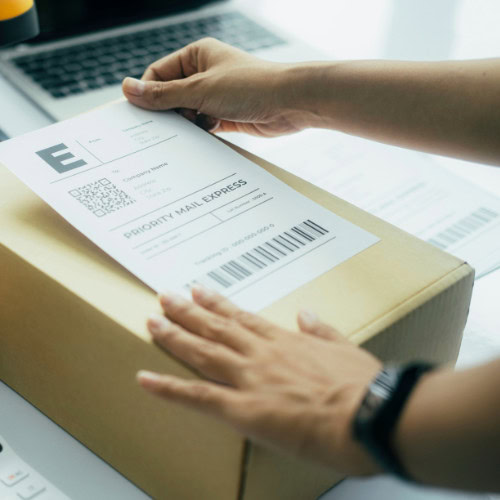
Collect, inventory, pack and drop off or ship your media
Legacy Digital receiving another shipment of media to convert

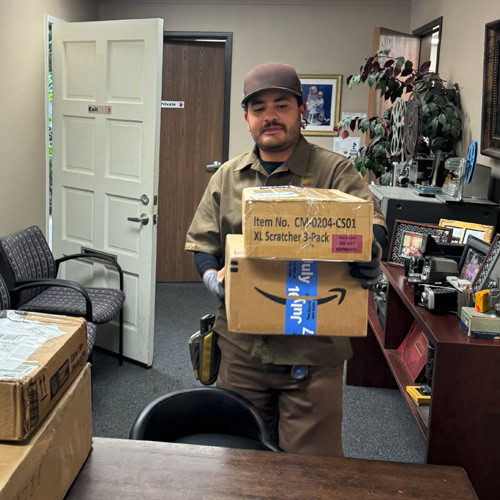
We receive your media, prep and clean it, digitize it

Family watching old photos together

You rediscover past memories with family and friends

Frequently Asked Questions

With the current discount, transfers start at $0.28 per foot ($14.00 per standard 50 ft. reel) on the Gold tier. Sound film adds $2.00 per reel. Larger reels are simply more feet: a 200 ft. reel counts as four standard reels, a 400 ft. reel as eight. Use the online estimator for a down-to-the-penny quote; it assumes full reels, so most clients pay slightly less than their estimate.

The main reason you want to put your family memories on DVD is that DVDs last forever right? WRONG!! All DVDs have a shelf life and do fail eventually. And, once a disk starts to go bad, it becomes unreadable. So, instead of the picture fading or degrading a little at a time, you go from perfect to nothing in one step.

Most services like ours use regular disks. They are said to last 2 to 5 years. We don’t think that is acceptable so we use the top of the line Gold Archival DVD disks made by Mitsui. These disks are superior for two reasons: First, the construction of the disk is much more durable. It can take punishment and age better than any other disk. Second, the information layer is actually made of gold.

Gold can hold information better than the assortment of metals used in other disks. The result, a disk that is thoroughly tested and rated for a shelf life of over 100 years. These disks have been tested against other gold disks and every major maker of DVDs. They stand out as far superior in every case. That’s why we insist on using them, and that’s why you should insist on getting them.

Why doesn’t our competition use them?

Because they are many times more expensive than any other disk. When you want your data to outlast your grandchildren, insist on the best disks on the market, Mitsui Gold Archival DVD disks. And to play it safe, we recommend that you order a backup copy to keep at a second location just in case. (Blu-Ray disks are not available in gold yet, but we do use the highest rated Blu-Ray disks available. Again, backup copies are highly recommended.)

Regular 8 and super 8 mainly differ by the type of reel they are on. The center hole on a regular 8 reel is too small to fit a pencil through. On Super 8 film, the center hole is almost as large as a dime. If your Super 8 has sound, it will have chocolate brown stripes along one or both edges of the film.

8mm film of any type has holes on only one side and is skinnier than your finger.

16mm film is about as wide as a man’s index finger. If it has holes on both sides (make sure you check the actual film, not the white leader) it is silent film. If it has holes on only one side, it is sound film. 16mm film can come on reels as large as 1600 ft (about the size of a giant pizza).
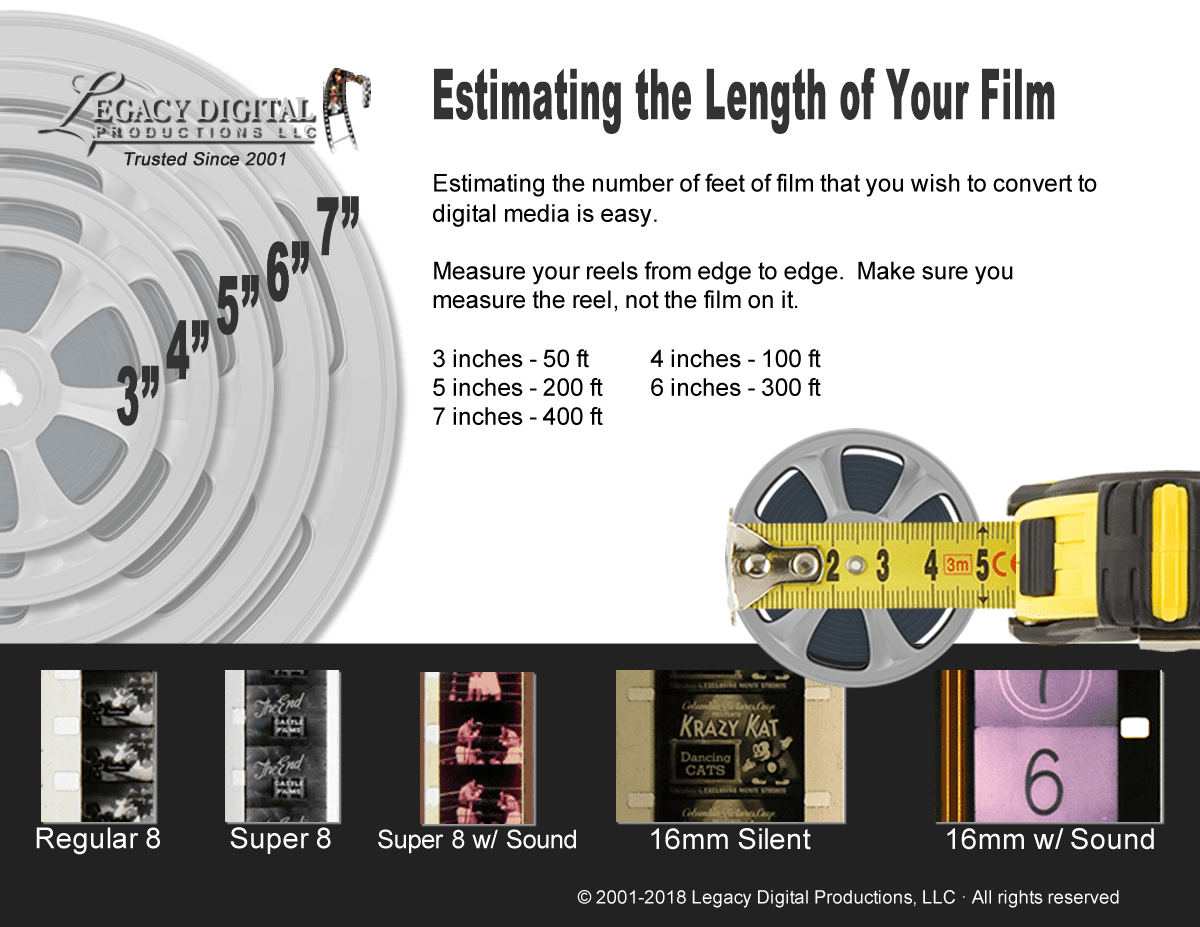
Legacy Digital 2018 Film Measuring Guide

The result you will get from your film transfer can vary greatly depending on the type of process you use. At the bottom of the list are services that will run your film on a projector and videotape the screen for you. This would represent the poorest quality process. This would be about a 2 on a 1 – 10 scale for quality.

The next step up would rate at about a 5 to 6 on the scale. This process is commonly called a telecine transfer. This machine looks like a projector, but instead of having a lense, it has a video chip that captures the image from the film. This yields OK results, but the original resolution is one fourth of what a dvd is capable of, and if you capture the film that way, you cannot take advantage of the full quality a dvd is capable of showing.

Our process would rate a 9.5 on the scale. The only way to get a better quality picture is to go to the high end Hollywood type transfer houses that usually do work for the studios. They can charge 10 to 15 times more than our prices and are certainly out of reach for family budgets.

When we transfer your film to dvds, we take the time to do it right. First we clean and recondition your film. We use the same film cleaner and process that motion picture studios use on their archival footage and master prints. (Watch out for the guys who use isopropyl alcohol. It is a drying agent and will damage your film in time. This saves them about $60.00 per quart, but the person who pays the price is you.)

We then scan your film frame by frame directly to lossless computer files. This frame by frame capture gives you superior results, it is much safer than other methods, and has much better color, contrast, and clarity. Frame captures are done by a high definition 1080p optics system that will trump other telecine systems every time. Frame scans are also natively high definition, 1080p resolution so there is no attempt to upscale inferior footage.

Before we burn your files to disk, we take the time to go through the footage and adjust color, contrast and brightness to enhance the picture quality even further. We can’t always make old film perfect, but we can make it look as good as possible.

We use only the best professional, gold archival dvd disks for top of the line performance and longevity (Blu-Ray disk are not yet available in gold, but we do use the highest rated disks available). These top of the line disks are tested and rated for an over 100 year shelf life. Don’t believe everything you hear about dvds lasting forever, the disks you use make all the difference. These disks are the longest lasting media of any kind. They also cost us about 10 times more than other disks.

That’s why most people don’t use them, but again, the person who pays is you. Our disks are also NOT copy protected. You are welcome to make copies of your product all you want. I recommend at least one backup copy on the gold disks, but you will not have to wonder if I am still in business 5 or 10 years in the future if you want another copy. You will be able to do it yourself.

High-definition or 2K digital files delivered on flash drive, hard drive, or in the cloud, fully editable on Windows or Mac and never copy-protected. Gold archival DVDs (rated for a 100+ year shelf life) and Blu-ray discs are available on the Gold and Platinum tiers for family members who prefer discs

For larger orders our service includes pick up and delivery throughout the Southern California area. We are located in Orange, CA. We cover all of San Diego, Orange, Riverside, LA, and most of San Bernardino Counties. Please understand though that we are willing to go farther for larger orders.

For smaller orders or locations outside our delivery area, you can use Fedex or UPS. Just make sure you have a tracking number. You are always welcome to bring your film to our studio as well.

Our services are conducted in house by our staff only. No one takes a single reel out of the office, and no one touches the film except our small staff of video technicians.

Only one family’s film is in any one location at a time. If your film is being cleaned and reconditioned, only your film is in that area. If your film is being scanned, no one else’s film is anywhere near the capture station. When your film is not being worked on, it is tied into a bag with your name inside and on the outside of the bag.

No one has ever lost a reel with us and we have been in business since 2001 with thousands of customers.

Our systems are very slow and gentle. There are no bright or hot bulbs and no sprockets or gears in our capture systems so your film cannot be damaged by the process.

Your film will be returned to you in better condition than it is now. As needed, splices are repaired etc.

Yes. The problem with the internet is that to show you a full quality video clip of any length would take forever to download etc. Although a web sample cannot quite do our film transfer justice, there is a small sample of our transfer on the site. To view, just return to the home page and click on the large film transfer graphic on the upper left of the page. When we meet, I will show you a full quality sample DVD of a real customer of mine (with his permission). That way you will see it just the way you will experience yours, on your TV.

This is a two step process. First we capture the picture through our frame-by-frame metod. Then we have to run your film through a projector to capture the sound. We then match them up in our editing system. This process does put your film through a projector so there is some risk of damage, but our machines are in brand new condition and closely monitored.

We can run Super 8 with magnetic sound (a chocolate brown stripe on the edges of the film) and 16mm with either type of sound (sprocket holes on only one side of the film)

Because of our gentle frame-by-frame scanning method, we can run film that is older and in poorer shape than anyone else. We have run film from 1924 successfully. The condition of your film can possibly be too poor to run. Here’s how you check: open a reel and unroll it from the spool by pulling the end straight out. If your film can withstand this simple test, you are probably fine.

Next, look at the film from side to side (across the width). As film ages it can tend to curl into itself. Instead of being flat, it can curl so far it can look like a tube instead. If it is curled, test it by pinching the film between your thumb and first finger. If you can pinch it and flatten it in your fingers without breaking it, your film will run fine. Please note, we never charge for film we cannot run, so if you’re not sure, there is nothing to lose by trying.

Please call the office to inquire about our current backlog.

We are usually about 4 to 6 weeks out, but that depends on the season and current circumstances. Rush orders are available at additional cost. This will ensure that your order will be completed within one to two weeks depending on the size of your order. It is always difficult to say what day your film will be done exactly.

Everyone’s film is different and we take the time on every single order to make sure it is done right, even if we have to spend extra time and redo scenes until we are happy with them.

Please understand that you are hiring us because of the attention we pay to detail and quality, not speed.

How Legacy Digital compares on film quality

The mail-in box services (Legacybox, Southtree, Kodak Digitizing) and the big-box stores digitize film at 480p standard definition, one-to-one, with no color correction. Legacy Digital scans at Full HD 1080p or 2K (higher than the film itself), with scene-by-scene color restoration, on studio-grade equipment (the type developed for the Academy of Motion Pictures). That is why Hollywood studios and executives, Netflix productions, and universities choose us.

Film quality Mail-in and big-box services Legacy Digital
Scan resolution 480p SD (their published spec) Full HD 1080p or 2K
Color and restoration One-to-one, none Scene-by-scene color restoration + grain reduction
Who does it Mailed to a bulk facility In-house since 2001, studio-grade scanners, never lost an item

Compare us directly: Legacy Digital vs Legacybox, Southtree vs Legacybox, Kodak Digitizing vs Legacybox, or see how we compare to every major service.

X

Immediate Savings:

Save 30-36% Today on the Industry's Highest Quality Digital Conversions!  Plus take an additional 10% OFF on services over $250!

One Time Opportunity:
Immediately SAVE an additional 10% Off our already low prices!

X

"*" indicates required fields

This field is for validation purposes and should be left unchanged.
This field is hidden when viewing the form
Name*

No thank you.

Request coupon to take an additional 10% off on any order over $250…