Convert Your 16mm Film to Digital, Frame by Frame.
The wider film behind serious home movies and productions
16mm is twice as wide as 8mm, holds far more detail, and was the format for serious filmmakers, schools, and institutions. We scan it one frame at a time in true HD or 2K on Motion Picture Academy-grade equipment, resolving detail that lower-quality transfers throw away. We also convert 8mm film to digital, Super 8 film to digital, and Technicolor film to digital.
Get a Free 16mm QuoteIn-house in Orange, CA since 2001. Over a million reels handled, never one lost.
HD & 2K
Frame-by-frame scan. 16mm holds the detail to justify 2K.
Since 2001
Hollywood 's Choice
In-House Processing
Expert Technicians
Trusted with the Steven Spielberg documentary reels and Chapman University Film School · All film formats →
See the 16mm Legacy Digital difference.
16mm film contains far more detail than many transfer services capture. Lower-quality transfers can produce soft images, muted colors, and crushed blacks. Our frame-by-frame scanning process preserves the full frame, carefully adjusts color and exposure scene by scene, and delivers the highest quality digital version your film can provide.




What 16mm Is, and How to Spot It
At 16mm wide, this film is twice the width of 8mm, so it is easy to identify and holds substantially more detail. It was the choice for documentaries, schools, institutions, and ambitious home moviemakers.
Hold it up: 16mm is clearly wider than 8mm or Super 8, which makes it the easiest film format to recognize at a glance.
Sprocket holes on one side usually mean a soundtrack; holes on both sides usually mean silent. We read the sound in sync when it is there.
16mm often comes on larger reels holding hundreds or thousands of feet, so a single reel can be a substantial film.
Because 16mm carries more detail, it benefits most from our Professional 2K scan, which resolves more than the film even needs.
Why Digitize 16mm Now
16mm frequently holds documentaries, institutional history, and one-of-a-kind productions that exist nowhere else.
Like all film, 16mm fades, shrinks, and grows brittle. Color correction recovers much of it, but only what remains.
Aging film can develop vinegar syndrome, a sour-smelling decay that warps the reel. Caught early, most still transfers.
Old projectors scratch and can burn film. Do not thread a valuable reel at home; we scan it without ever projecting it.
16mm Film Pricing
Film is priced by the foot, and you pay only for the footage we actually transfer, not per reel. Here is what the common reels cost at the Gold HD special; because 16mm holds more detail, many clients choose Platinum or Professional 2K.
| Reel size | Gold HD special ($0.28/ft) |
|---|---|
| 5 inch | $56 |
| 7 inch | $112 |
| 10 inch | $224 |
Gold HD is $0.28/ft (regularly $0.40). Platinum HD adds scene-by-scene color correction and grain reduction; Professional 2K is our highest resolution and is popular for 16mm. Sound film is 10 cents more per foot. See the film hub for all three tiers. $50 order minimum.
Why Our 16mm Transfers Look Better
Our Professional 2K scan resolves more detail than 16mm itself carries, capturing everything the film holds.
We capture each frame optically on the same industrial equipment the studios use, never by projecting and re-filming.
For sound 16mm, we capture the soundtrack alongside the picture so the finished video plays with its original audio.
Cold LED light, no sprockets on the picture area, cleaned and lubricated first, all by our own team in Orange, California.
How It Works
Getting your 16mm reels to us is simple, and your originals always come home.
Send it to us
Free local pickup across Southern California, a secure prepaid shipping kit by mail, or drop off at our Orange, CA counter.
We digitize it in-house
Each reel is cleaned, then scanned frame by frame in HD or 2K, with sound captured when present and optional color correction.
You use it
Get your footage as MP4, MOV, or ProRes on a drive or disc, organized and ready to watch, edit, or archive.
Converting 16mm Film to Digital: A Complete Guide to Preserving Your Reels
Maybe you found them in your father’s closet. Maybe your church, school, or family business cleaned out a storage room and handed you a box of metal canisters. However they came to you, you’re now the keeper of 16mm film reels, and the memories, history, and stories recorded on them.
The question is: what do you do with them now?
I’ve spent several decades in the film transfer industry, and in that time my company has digitized millions of feet of film in every gauge ever sold to the public. 16mm holds a special place in that history, and in this guide I’ll walk you through everything you need to know to get your reels converted to digital the right way.
Why 16mm Film Is Worth Digitizing Properly
Here’s something many people don’t realize: 16mm is not just “bigger 8mm.”
When Kodak introduced 16mm in 1923, it became the workhorse format of the twentieth century. Yes, well-off families used it for home movies. But 16mm was also the format of schools, churches, newsrooms, corporations, the military, and independent filmmakers. If you’ve inherited 16mm reels, there’s a real chance you’re holding more than birthday parties. You may have wedding films from the 1930s, small-town newsreel footage, a company’s history, or a congregation’s story.
And because the 16mm frame is roughly four times the area of an 8mm frame, it captured far more detail. That detail is still sitting on your reels, waiting to be recovered, but only if the film is scanned at a resolution and quality level that can actually pull it off the celluloid.
That’s exactly why cutting corners on a 16mm transfer is such a shame. The format can look stunning when digitized correctly.
Should You Digitize 16mm Film Yourself?
Let’s address the do-it-yourself question up front, because it’s the first thing most people research.
The inexpensive film digitizers you’ll find online are built almost exclusively for 8mm and Super 8. Very few consumer machines handle 16mm at all, and the ones that claim to rarely handle it well. Add in the realities of 16mm (larger reels, longer footage lengths, optical or magnetic soundtracks, and film that may be seventy or ninety years old) and the DIY route becomes far less practical than it first appears.
There’s also the risk factor. Old acetate film can be brittle, shrunken, or in the early stages of vinegar syndrome, a chemical decay you can literally smell: it’s sharp, like vinegar. Running fragile film through a hobbyist machine, or worse, an old projector, can destroy footage that can never be re-shot.
My honest advice, as someone who has seen the aftermath many times: this is a job worth hiring out. My company, Legacy Digital Productions, has handled 16mm work for everyone from families to Hollywood studios. Our transfers appear in the HBO documentary Spielberg, for which we digitized Steven Spielberg’s own early films. The producers could have gone anywhere. They came to us, and they’ve come back since.
What Separates a Great 16mm Transfer Company from a Mediocre One
A decade ago, you could count the serious film transfer labs on a few hands. Today, hundreds of companies advertise 16mm film transfer services, and the gap between the best and the worst is enormous.
At the bottom of the market are outfits that project your film onto a screen and record it with a video camera. With 16mm, this approach is especially tragic: you’re taking the most detailed home-movie format ever made and smearing it through two lenses, a hot projector bulb, and a wall.
In the middle are companies running yesterday’s scanning equipment, often machines that labs like ours retired years ago.
At the top are labs that treat 16mm the way film archives do, with modern sprocketless scanners, proper film preparation, and real post-production.
Here are the three things to evaluate before you ship your reels anywhere:
- How they prepare and handle your film before scanning
- What scanning technology they use
- What they do after the scan, and what formats and media you receive
Let’s take these one at a time.
Before the Scan: Inspection, Cleaning, and Film Preparation
Inspection Comes First
A professional lab inspects every 16mm reel on arrival. With this format, inspection matters even more than usual: reels can run 400, 800, even 1,600 feet, and a single reel may contain decades-old splices that will fail under tension. The lab should check for shrinkage, brittleness, mold, vinegar syndrome, and weak splices, and repair or re-splice as needed before the film ever touches a scanner.
Cleaning and Reconditioning
Next comes cleaning and reconditioning, and this step is not optional. Decades of dust, oxidized lubricant, and storage residue sit on the surface of your film, and every speck of it will be captured in crisp detail by a high-resolution scanner if it isn’t removed.
The chemistry matters here. Professional film cleaning solutions vary widely in quality and price, and the cheap ones can do real harm to old emulsion. At Legacy Digital we developed our own cleaning system, one that other transfer labs around the world now purchase and use, and the solutions we use don’t just prepare the film for scanning; they recondition and lubricate it, extending the life of the original reels for years to come.
A properly cleaned and lubricated reel is far less likely to break during the transfer, and the difference in image quality is visible in every frame.
The Scanning Technology: What to Ask Before You Commit
Frame-by-Frame Scanning Is Non-Negotiable
There are two ways to capture film digitally. The lesser method, continuous capture, records the film as it plays, essentially filming a moving image. Playback speed drifts, frames blur together, and 16mm’s biggest advantage (its detail) is thrown away. When sound is involved, speed drift makes voices warble noticeably.
The professional method is true frame-by-frame scanning: the machine photographs every single frame of your film as an individual image. The result plays back at the correct speed, the audio stays true, and, critically, each frame becomes its own picture that can be individually color corrected later.
Every 16mm reel that comes through Legacy Digital is scanned frame by frame, with no exceptions.
Resolution: Where 16mm Really Pays Off
Resolution is where 16mm rewards you for choosing the right lab. An 8mm frame has only so much detail to give; a 16mm frame has dramatically more. Scanning 16mm at low resolution is like photographing a painting through a screen door: the information is there, but you’re not capturing it.
Insist on a lab that scans beyond Full HD 1080 and up to 2K. At that level, 16mm footage can look remarkably close to how it looked through the camera lens generations ago. At Legacy Digital, all 16mm scanning is performed beyond Full HD and up to our Premium Quality 2K level, with or without sound. It’s the peak of the industry, and it’s the only way we work.
Sound on 16mm: Optical and Magnetic Tracks
Here’s a consideration that simply doesn’t come up with most 8mm film: sound. A significant share of 16mm film, especially school, church, business, and news footage, carries audio, recorded either as an optical soundtrack (a wavy stripe exposed along the film’s edge) or a magnetic stripe.
Ask any prospective lab whether their scanner reads both optical and magnetic 16mm soundtracks, and whether audio is captured in sync during the frame-by-frame scan. A lab that can’t answer that question confidently shouldn’t be handling your sound film.
Gentle Film Handling: Sprocketless Transport and Cold LED Light
Two more equipment questions protect your originals during the scan itself.
First, film transport. Projectors and older transfer machines pull film by its sprocket holes with metal teeth, and on aged 16mm, those perforations may be the most fragile part of the reel. Modern archival scanners use sprocketless, touchless roller transport that moves the film on gentle, calibrated tension with nothing gripping the perforations at all. Shrunken and warped film that would jam or tear in a projector glides through safely.
Second, illumination. Incandescent bulbs run hot, and heat is one of old film’s worst enemies. Today’s scanners illuminate the film with cold LED light: no heat stress on the film, and adjustable brightness that actually improves the captured image.
Legacy Digital’s 16mm scanners use both: touchless sprocketless transport and cool LED illumination on every machine.
After the Scan: The Post-Production That Most Labs Skip
Many transfer companies consider the job finished when the scanner stops. What you get is whatever came off the machine, take it or leave it.
The best labs treat the scan as raw material, and the difference shows up the moment you put the footage on a big TV. Two post-production steps matter most.
Scene-by-Scene Color Correction
Film ages, and it doesn’t age evenly. One scene on your reel may have faded toward red while the next is dark and murky. Scene-by-scene color correction means a technician (or trained software, reviewed by a technician) adjusts brightness, contrast, and color balance for each individual scene, restoring the footage as close as possible to what the camera originally saw. Because frame-by-frame scanning captured every frame as its own image, corrections can be made with a precision that continuous capture can never match.
Intelligent Grain Reduction
Film grain is part of the medium, but decades of aging can exaggerate it into distracting noise, especially once footage is enlarged on a modern television. Advanced grain-reduction algorithms smooth that exaggerated noise while preserving genuine picture detail, giving the footage a natural, filmic look rather than a harsh, gritty one.
At Legacy Digital, both scene-by-scene color correction and advanced grain reduction are included at no additional charge with our Premium Quality service.
Picking the Right Digital File Format for Your 16mm Footage
Once your film is scanned and corrected, you’ll choose the file format for delivery. The right answer depends entirely on what you plan to do with the footage. Better labs let you choose; lesser ones simply hand you whatever is smallest.
MP4: For Watching and Sharing
For most families and organizations, MP4 is the everyday answer. It plays on essentially every modern device (TVs, phones, laptops, tablets) and uploads cleanly to YouTube, Vimeo, and photo services. Files are compact and easy to email or share. Its one limitation: as a compressed format, it’s a finished product rather than an editing master.
ProRes / QuickTime MOV: The Archival and Editing Master
If your 16mm footage has historical value, or if a documentary edit is anywhere in its future, ask for a ProRes master in a QuickTime MOV container. This is the format professional editors and archives work in: near-lossless, holding every bit of detail the 2K scan recovered. Expect large files (a hard drive becomes essential), but for irreplaceable footage, a ProRes master is the gold standard.
MKV: For the Technically Inclined
The open-source Matroska container is beloved by digital archivists for its flexibility, with support for multiple audio tracks, chapters, and any codec. Its weakness is playback: plenty of TVs, disc players, and Apple devices won’t open it without third-party software. Choose it only if you know your setup handles it.
AVI: For Legacy Systems
The old Microsoft AVI container, typically with DivX or Xvid compression, survives mainly for compatibility with older Windows machines and aging media players. It’s rarely the best choice for new transfers, but if you have a specific legacy system to feed, it’s available.
If You Plan to Edit
One rule of thumb worth remembering: edit from masters, deliver in MP4. If your footage is headed into Adobe Premiere, Final Cut Pro, or DaVinci Resolve, say for a family documentary or an organization’s anniversary video, request ProRes or a high-bitrate master. Re-compressing an already-compressed file costs you quality at every export.
After we digitize your 16mm film at Legacy Digital, you choose the delivery formats that fit your plans. And if you’re not sure, we’ll walk you through it.
Where Should Your Digital Files Live? Drives, Discs, and the Cloud
16mm collections tend to be larger than 8mm collections: longer reels, more footage, bigger files, especially at 2K. That makes the delivery-media decision worth a moment’s thought. Most of our customers combine two or three of the options below.
Hard Drive
For 16mm, a hard drive is very often the right primary choice. It’s the only medium that comfortably holds a large collection at full quality, including ProRes masters, and it’s the cheapest storage per gigabyte by a wide margin. Just remember that every drive eventually fails: a hard drive should be a copy, never the only copy.
USB Thumb Drive
Perfect as the everyday copy. It plugs into smart TVs and computers alike, survives being tossed in a drawer, and makes duplicating files for relatives trivial. For modest collections in MP4 format, a thumb drive alone may hold everything.
SD Card
Compact, convenient, and ideal if your playback device has a card slot. Small enough to live in a safe or safety-deposit box, and small enough to lose, so label it and keep a second copy elsewhere.
Blu-ray Disc
Blu-ray preserves your footage in true high definition on a disc that plays in any Blu-ray player, a pleasant option for TV viewing and thoughtful gifts. Quality discs, stored well, can last decades. Since disc players are gradually disappearing from living rooms, treat Blu-ray as a companion to file-based copies.
DVD
Still the most familiar format for older relatives, and still a fine sharing copy. Be aware of its ceiling, though: DVD is a standard-definition format, so your 2K scan must be down-converted to fit it. Lovely for the grandparents’ player; wrong as your master copy.
Cloud Storage
Cloud delivery to Google Drive, Dropbox, or a similar service lets far-flung family stream the footage instantly and share it with a link. Just as important, it’s an off-site backup that survives house fires, floods, and dead hard drives. Weigh the ongoing storage cost for large 2K collections against that peace of mind.
The Three-Copy Rule
Archivists live by a simple principle, and we recommend it to every customer: keep three copies, on two different types of media, with one stored off-site. In practice: a hard drive at home, a cloud backup, and discs or a thumb drive shared with family. Your film survived the better part of a century in a canister; give the digital version the same fighting chance.
Getting Your Originals Back
A professional transfer ends the way it began: your original 16mm reels, carefully repacked, shipped back to you with your digital copies via a tracked and insured carrier. The originals remain yours, cleaned, reconditioned, and in better shape than when they left.
Then Comes the Best Part
There’s a moment we never get tired of hearing about: the family gathered around the television, watching faces and places that haven’t moved in fifty years suddenly come back to life, at the right speed, in restored color, with sound if the film carried it.
That’s the whole point of all this care. Make the popcorn. Enjoy it.
About Legacy Digital Productions
Since 2001, Legacy Digital Productions has digitized 16mm, 8mm, and Super 8 film for families, churches, schools, and studios across North America. We use the same equipment and processes trusted by the Academy of Motion Pictures in Hollywood (MPAA), the USC School of Cinematic Arts, and the UCLA School of Theater, Film, and Television.
16mm Film Questions
MP4 by default, or MOV/ProRes on request, on a flash drive or hard drive, and optionally on DVD or Blu-ray. Your original reels come home too.
Yes. We handle reels from small to very large, including the substantial reels common in documentary and institutional collections.
Yes. Sound 16mm carries an audio track that we read in sync as we scan, so your video plays with its original sound. Sound film is 10 cents more per foot.
Often, yes. 16mm carries enough detail to reward the higher resolution, which is why Professional 2K is a popular choice for it.
From $0.28 per foot at the Gold HD special (regularly $0.40). Because 16mm holds more detail, many clients choose Platinum or Professional 2K; see the film hub for all three tiers. You pay only for the footage we actually transfer.
Yes, a $50 order minimum, not counting drives.
On audio, billing is by the hour of sound we actually recover, and blank tape is never charged, so hourly work and any reel minimum simply count toward the order minimum together.
With the current discount, transfers start at $0.28 per foot ($14.00 per standard 50 ft. reel) on the Gold tier. Sound film adds $2.00 per reel. Larger reels are simply more feet: a 200 ft. reel counts as four standard reels, a 400 ft. reel as eight. Use the online estimator for a down-to-the-penny quote; it assumes full reels, so most clients pay slightly less than their estimate.
The main reason you want to put your family memories on DVD is that DVDs last forever right? WRONG!! All DVDs have a shelf life and do fail eventually. And, once a disk starts to go bad, it becomes unreadable. So, instead of the picture fading or degrading a little at a time, you go from perfect to nothing in one step.
Most services like ours use regular disks. They are said to last 2 to 5 years. We don’t think that is acceptable so we use the top of the line long lasting archival DVDs available. These disks are superior for two reasons: First, the construction of the disk is much more durable. It can take punishment and age better than any other disk. Second, the recording layer is built to a true archival standard.
This archival layer holds information far better than the dyes and metals used in ordinary disks. The result, a disk that is thoroughly tested and rated for a shelf life of over 100 years. These discs have been tested against every major maker of DVDs. They stand out as far superior in every case. That’s why we insist on using them, and that’s why you should insist on getting them.
Why doesn’t our competition use them?
Because they are many times more expensive than any other disk. When you want your data to outlast your grandchildren, insist on the best long lasting archival DVDs on the market. And to play it safe, we recommend that you order a backup copy to keep at a second location just in case. (Blu-ray discs are not made to the same archival standard, but we do use the highest rated Blu-ray discs available. Again, backup copies are highly recommended.)
Regular 8 and super 8 mainly differ by the type of reel they are on. The center hole on a regular 8 reel is too small to fit a pencil through. On Super 8 film, the center hole is almost as large as a dime. If your Super 8 has sound, it will have chocolate brown stripes along one or both edges of the film.
8mm film of any type has holes on only one side and is skinnier than your finger.
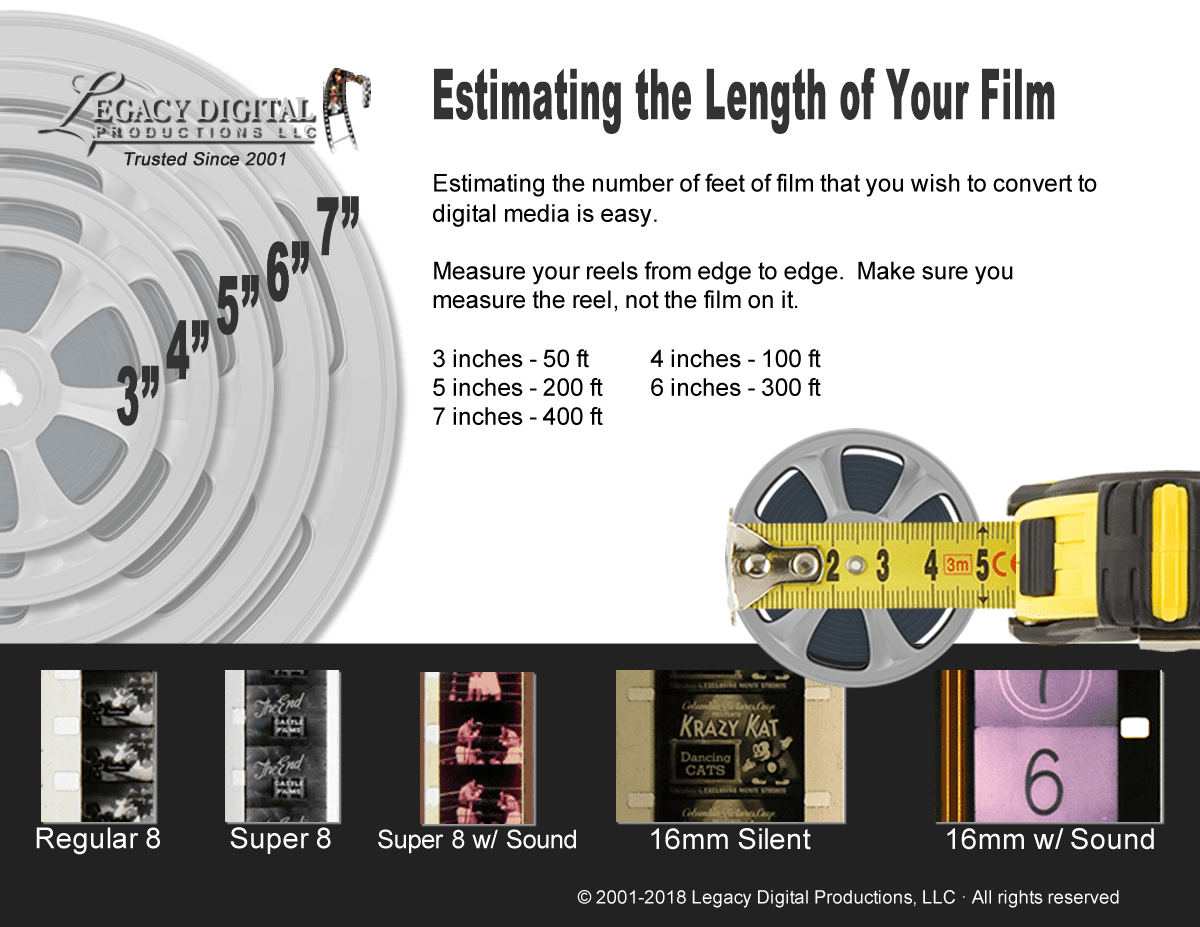
16mm film is about as wide as a man’s index finger. If it has holes on both sides (make sure you check the actual film, not the white leader) it is silent film. If it has holes on only one side, it is sound film. 16mm film can come on reels as large as 1600 ft (about the size of a giant pizza).
The result you will get from your film transfer can vary greatly depending on the type of process you use. At the bottom of the list are services that will run your film on a projector and videotape the screen for you. This would represent the poorest quality process. This would be about a 2 on a 1 – 10 scale for quality.
The next step up would rate at about a 5 to 6 on the scale. This process is commonly called a telecine transfer. This machine looks like a projector, but instead of having a lense, it has a video chip that captures the image from the film. This yields OK results, but the original resolution is one fourth of what a dvd is capable of, and if you capture the film that way, you cannot take advantage of the full quality a dvd is capable of showing.
Our process would rate a 9.5 on the scale. The only way to get a better quality picture is to go to the high end Hollywood type transfer houses that usually do work for the studios. They can charge 10 to 15 times more than our prices and are certainly out of reach for family budgets.
When we transfer your film to dvds, we take the time to do it right. First we clean and recondition your film. We use the same film cleaner and process that motion picture studios use on their archival footage and master prints. (Watch out for the guys who use isopropyl alcohol. It is a drying agent and will damage your film in time. This saves them about $60.00 per quart, but the person who pays the price is you.)
We then scan your film frame by frame directly to lossless computer files. This frame by frame capture gives you superior results, it is much safer than other methods, and has much better color, contrast, and clarity. Frame captures are done by a high definition 1080p optics system that will trump other telecine systems every time. Frame scans are also natively high definition, 1080p resolution so there is no attempt to upscale inferior footage.
Before we burn your files to disk, we take the time to go through the footage and adjust color, contrast and brightness to enhance the picture quality even further. We can’t always make old film perfect, but we can make it look as good as possible.
We use only the best professional, long lasting archival DVDs for top of the line performance and longevity (Blu-ray discs are not made to the same archival standard, but we do use the highest rated discs available). These top of the line disks are tested and rated for an over 100 year shelf life. Don’t believe everything you hear about dvds lasting forever, the disks you use make all the difference. These disks are the longest lasting media of any kind. They also cost us about 10 times more than other disks.
That’s why most people don’t use them, but again, the person who pays is you. Our disks are also NOT copy protected. You are welcome to make copies of your product all you want. I recommend at least one backup copy on the long lasting archival DVDs, but you will not have to wonder if I am still in business 5 or 10 years in the future if you want another copy. You will be able to do it yourself.
Have Other Film Too?
We convert every reel format. Tap one, or send a mixed box and we identify and quote each reel.
16mm Holds the Most Detail. Capture All of It.
Get a free, itemized quote. We measure every reel, tell you the exact cost, and your originals always come home.
Get My Free 16mm QuoteOr call (888) 405-2685 · Orange, CA · In-house since 2001